

Use this guide when delivery fails, a sync remains unfinished, or Outlook is incorrect after webhook acceptance.
Controlled staging evaluation. Contact Krosoft support for availability on your installation. Discovery coverage must be checked against your expected Tempo planning before production rollout.
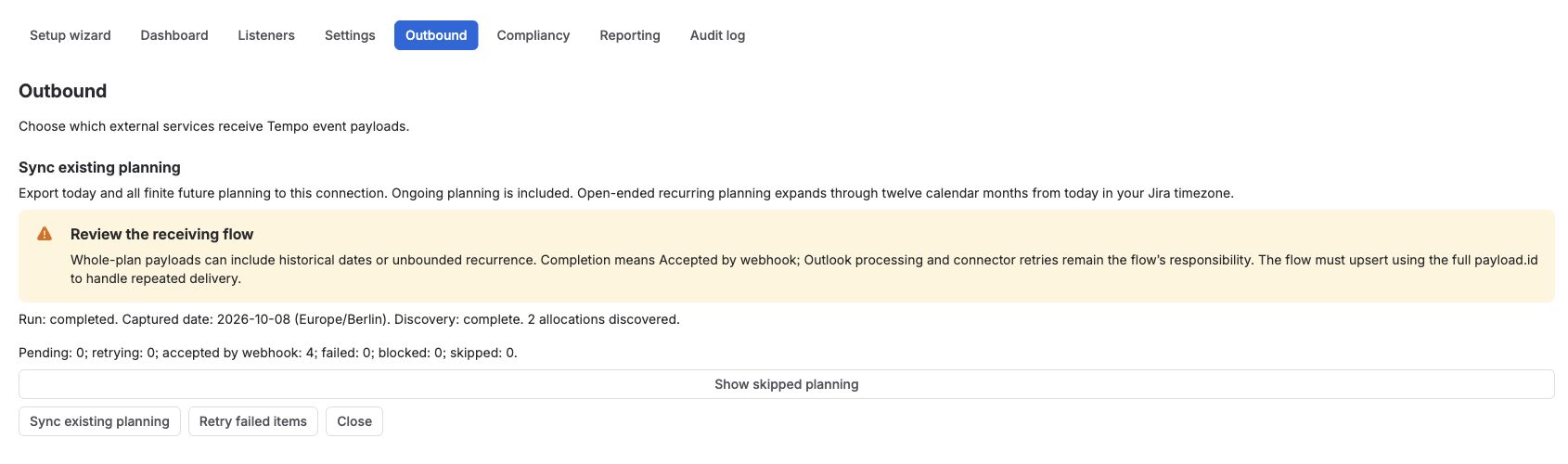
Read the status
|
Status |
What to do |
|---|---|
|
Discovery |
Wait for discovery to finish. Resolve an incomplete-discovery result before confirming coverage. |
|
Pending |
Delivery is waiting. Check that the connection is enabled. |
|
Retrying |
A temporary error has a scheduled retry. Check the error and allow that retry to run. |
|
Accepted by webhook |
Check flow run history and Outlook; the endpoint has acknowledged the request. |
|
Failed |
Correct the reported cause, then retry the failed items. |
|
Blocked |
Resolve the earlier failed request for this plan and connection. Later changes must wait. |
|
Skipped |
Review the reason and compare it with the planning you expected to export. |
Recover a failed delivery
-
Open the connection’s Preview planning sync panel. Choose Show failures and use Next details to read additional pages. Use Show skipped planning to inspect exclusions.
-
Match the error to Planning Sync audit entries and, where present, the Power Automate run. Use the table below to correct the cause.
-
Choose Retry failed items. Accepted items stay accepted; failed items receive a fresh set of attempts and keep their position ahead of later changes.
-
Check the run again, then verify the final Outlook state. Discovery must also finish successfully if it was incomplete.
Retries use the stored request. Editing the outbound template or other nonsecret connection settings affects subsequent batches, not an already prepared request. Fix the receiving schema or routing where appropriate; contact Krosoft support if the stored request itself needs correction. Do not delete and recreate the connection to bypass failed work.
A failed request holds later changes for that plan and connection. Other plans can continue. Do not manually replay an older create after deletion or send a later update to bypass the failure.
Before webhook acceptance
|
Symptom |
Action |
Expected result |
|---|---|---|
|
HTTP 400 / schema rejection |
Inspect the resolved body and align the receiver schema with required IDs, nullable metadata and daily date/time fields. Escalate if the stored payload is wrong. |
After correction and retry, the endpoint accepts the same request. |
|
HTTP 401/403 or no flow run |
Verify the saved endpoint, enabled flow and trigger authentication requirements with the integration administrator. |
The request reaches the intended flow and is accepted. |
|
Endpoint returns HTTP 429 |
Let the destination cooldown and scheduled retry run; review receiving-flow capacity. |
Delivery resumes after the endpoint’s retry delay. |
|
User or calendar not found |
Correct the explicit routing map and connector permissions. Verify the intended mailbox and calendar; do not route an unknown user to another calendar. |
The flow reaches the intended writable calendar. |
|
Incomplete discovery |
Check Tempo/Jira visibility, saved authentication and reported pagination/API errors with the administrator or support. |
Discovery finishes and the expected plans are accounted for. |
|
Duplicate matches / HTTP 409 |
Identify the managed duplicates and agree a scoped cleanup. Fix the receiver’s correlation/concurrency design before retrying. |
Exactly one managed appointment matches the full occurrence key. |
After webhook acceptance
A timed-out response can coexist with a completed calendar write. In Power Automate, check the Response action and calendar action separately.
An Outlook connector’s downstream HTTP 429 does not automatically become an HTTP 429 response to Planning Sync. The app’s destination cooldown applies when its endpoint returns 429. Once accepted, downstream retries and monitoring belong to your flow.
|
Symptom |
Action |
Expected result |
|---|---|---|
|
Accepted but no appointment |
Open the accepted flow run and inspect Outlook actions, target calendar and full occurrence-key lookup. |
The downstream run completes and the intended appointment exists. |
|
Outlook connector HTTP 429 |
Allow or configure downstream connector retries and review Microsoft limits. Do not resend accepted requests as the first remedy. |
The flow recovers the failed Outlook action without duplicate appointments. |
|
Wrong dates, times or calendar |
Check daily date/time expressions, planning timezone and explicit calendar routing. |
Managed appointments match the expected planning in the intended calendar. |
Contact support
Send the site, installed version, destination label, plan/occurrence ID, captured date/timezone, status counts, sanitized audit result and flow error. Include whether the issue is before webhook acceptance or inside Outlook processing. Omit tokens, full signed webhook URLs and private calendar content.